-
Schund und Sühne
Wer uns Klassiker wie “Heftromane schreiben und veröffentlichen” und “Als die Omma den Huren noch Taubensuppe kochte” gebracht hat, von dem liest man auch über Schund und Sühne. Ab dem 31. Januar 2019.
-
Bestseller berechnen
Die Süddeutsche Zeitung berichtet über ein Hamburger Start-up-Unternehmen, das automatisiert ausrechnet, mit welcher Wahrscheinlichkeit ein literarischer Text ein Bestseller werden wird. In der SZ wird die Gründerin mit einer Trefferquote von 77% zitiert, im April 2018 waren es noch nur 70,3%, im Oktober 2017 waren es auch schon mal 80%.
Erstens: Die Trefferquote überzeugt mich nicht, solange ich nicht mehr Details kenne. Wenn ich 1000 Texte analysiere, von denen 800 tatsächlich Bestseller waren, erreiche ich 80% Trefferquote schon dann, wenn ich einfach alle Texte als Bestseller bewerte.
Zweitens: Ich glaube schon, dass automatisierte Textanalysen Korrelationen zwischen Textstruktur und kommerziellem Erfolg offenlegen können. Ich glaube aber nicht, dass es jenseits der Bedürfnisse einzelner Autorinnen und Autoren einen Markt dafür gibt, zumal nicht im Verlagssektor. Eine Lektorin oder ein Lektor wird nach Durchsicht der ersten paar Seiten eines Manuskripts beurteilen können, ob der Text etwas taugt. Eine Fehlerquote wird es geben, aber die hat der Algorithmus auch.
Weiterführend:
- Wie so eine Textanalyse praktisch funktioniert, zeigt die Konkurrenz.
- Die hat auch ein Beispiel veröffentlicht.
- Der New Yorker meint: “The Bestseller Code” Tells Us What We Already Know

-
Lens Shift

-
Winterkorrelationen
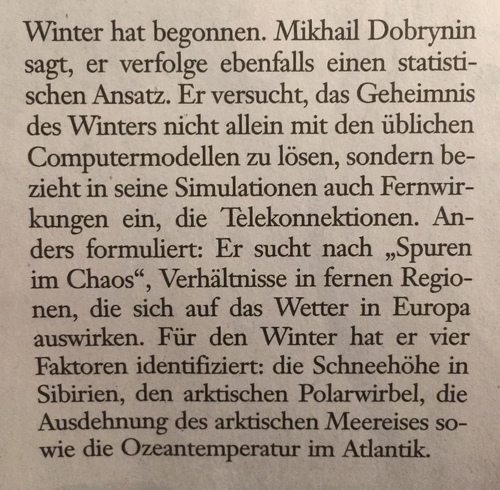
Die Frankfurter Allgemeine Sonntagszeitung berichtet heute auf S. 64 darüber, wie Korrelationen (“Telekonnektionen”) meteorologischer Ereignisse die Wettervorhersage verbessern.
-
AGB auf GitHub
Ich bin davon überzeugt, dass es sinnvoll ist, rechtliche Texte in Versionskontrollsystemen zu verwalten. Basecamp hat angekündigt, alle seine Vertragsbedingungen in GitHub zu veröffentlichen und zu pflegen.
-
Docker VPS
Wie üblich: Es ist offensichtlich, sobald man es weiß: Virtuelle Serverlösungen (VPS) sind virtualisiert, und darum kann es Einschränkungen dabei geben, in ihnen Virtualisierungssoftware wie Docker einzusetzen. Große deutsche Anbieter wie Strato und HostEurope unterstützen Docker in ihren VPS-Angeboten nicht. Andere Anbieter nutzen KVM zur Virtualisierung und da funktioniert Docker.
-
VMware kryptisch
Seufz. Nach einem Kernel-Update auf 4.15 startet VMware nicht mehr. Über meine Schwierigkeiten mit VMware nach Kernel-Updates hatte ich ja bereits einmal berichtet. Notgedrungen fange ich an, das Problem zu analysieren. Dieses Mal sind die Fehlerm...
-
Solus-Paket-Architektur
Hah. Kaum fange ich an, mich mich der Paketverwaltung von Solus zu beschäftigen, und kaum habe ich das ansatzweise verstanden, wird im Blog des Solus-Projekts ein exzellenter Artikel veröffentlicht, der sich genau mit diesem Thema beschäftigt.
-
Pakete erzeugen in Solus
Im zweite Teil meiner Recherche (dieser Beitrag) habe ich rausgekriegt, wie ich in Solus Software-Pakete erzeugen kann. Im Prinzip ist es alles einfach, sobald man das mit den Software-Paketen einmal verstanden hat. Für mich war es eine gewisse Le...
-
Pakete ausliefern in Solus
Ich beginne mein Unterfangen mit einer Recherche, wie das mit der Paketverwaltung in Solus im Detail funktioniert. Mir ist klar, dass ich zwei Komponenten des Systems verstehen muss: Zum einen muss ich in der Lage sein, Pakete zusammenzustellen, z...
Subscribe via feed.